---
title: Studio Considerations
description: Essential pre-shoot guidelines for Z-Capture with Genesis. Learn optimal lighting, clothing requirements, and calibration procedures for high-fidelity motion capture.
---
[Skip to content](https://docs.move.ai/knowledge/genesis-shoot-considerations#main-content)

Open main navigation
Close main navigation
- [Move](https://www.move.ai/)
[Move](https://www.move.ai/)
Welcome to the Move Knowledge Base
- There are no suggestions because the search field is empty.
1. [Move Docs](https://docs.move.ai/knowledge?hsLang=en)
2. [Genesis](https://docs.move.ai/knowledge/genesis?hsLang=en)
3. [System Prep & Setup](https://docs.move.ai/knowledge/genesis?hsLang=en#system-prep-setup)
# Studio Considerations
Before you begin recording your animations, it is essential to brief both your actors and capture crew on the procedures required to achieve optimal results.
### **Capture Volume**
The capture volume is the calibrated area where an actor's movements are tracked and processed into our animation. When you walk around the room during calibration, you are essentially 'drawing' the limits of this space. The edge of your capture volume is typically the point nearest to the cameras where the actor is still completely visible in the frame.
We recommend marking out the limits of the capture volume so that the actor doesn't accidentally leave the volume. The system requires full visibility of the actor’s body in order to achieve a high-quality calibration. Maintaining a clear line of sight is essential for high-fidelity tracking.
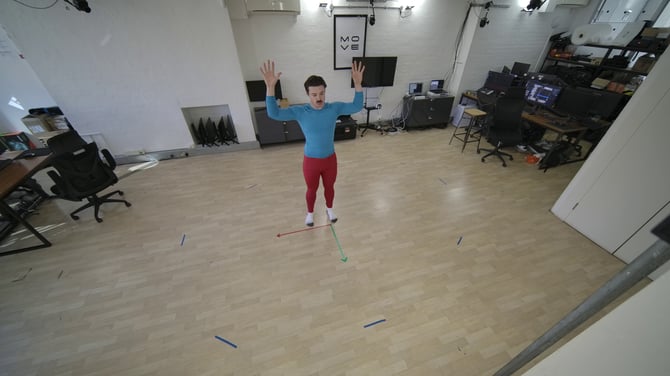
When recording, make sure no extra people are inside the capture volume if you don’t want them to be tracked. It’s also important that anyone standing on the sidelines stays clear of the cameras and doesn't step too close to the active space while you are recording your calibration.
### **Environment**
Please inspect your environment for any mirrors or reflective surfaces within the camera's field of view. Reflections can cause significant tracking interference, as the system may incorrectly identify them as additional actors in phantom locations.
If you record outdoors in wet conditions, please take steps to **mitigate** water droplets on the camera lenses. Moisture on the lens will distort the image and significantly degrade tracking accuracy.
### **Optimal Lighting**
It’s important that the capture volume has sufficient lighting in order for the system to have a clear picture of the actor's entire body in the space. If the lighting isn’t sufficient, the contrast between the actor and the background may not be clear. We recommend avoiding very dark lighting and extreme silhouettes for this reason.
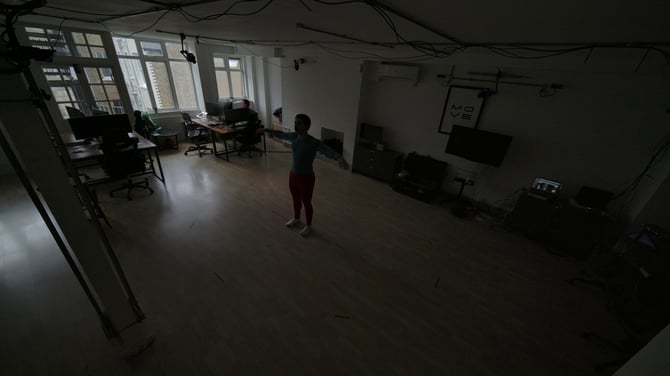
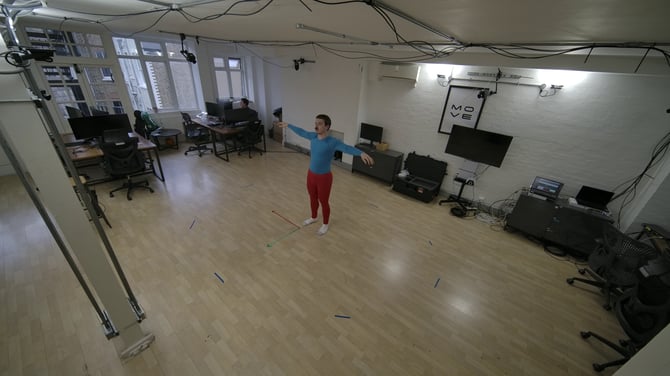
Our system has been rigorously tested across various environments, including studio, office, and specialised outdoor configurations.
It is important to avoid excessively bright lighting, as this can overexpose the actors and obscure essential body details. When these details are 'washed out,' it becomes significantly more difficult for our biomechanics model to interpret intricate movements accurately.
**Next Step:** [Framing The Cameras](https://docs.move.ai/knowledge/genesis-framing-up-your-cameras?hsLang=en) → Continue to the next article in System Prep & Setup.
- [Genesis](https://docs.move.ai/knowledge/genesis?hsLang=en#main-content)
- [Overview](https://docs.move.ai/knowledge/genesis?hsLang=en#overview)
- [System Prep & Setup](https://docs.move.ai/knowledge/genesis?hsLang=en#system-prep-setup)
- [Genesis Live](https://docs.move.ai/knowledge/genesis?hsLang=en#genesis-live)
- [Genesis Post](https://docs.move.ai/knowledge/genesis?hsLang=en#genesis-post)
- [Output Data](https://docs.move.ai/knowledge/genesis?hsLang=en#output-data)
- [Optimising your System](https://docs.move.ai/knowledge/genesis?hsLang=en#optimising-your-system)
- [System Management](https://docs.move.ai/knowledge/genesis?hsLang=en#system-management)
- [Release Notes](https://docs.move.ai/knowledge/genesis?hsLang=en#release-notes)
- [Move One](https://docs.move.ai/knowledge/move-one?hsLang=en#main-content)
- [Move One Pricing](https://docs.move.ai/knowledge/move-one?hsLang=en#move-one-pricing)
- [Move Platform](https://docs.move.ai/knowledge/move-one?hsLang=en#move-platform)
- [Move One iOS App](https://docs.move.ai/knowledge/move-one?hsLang=en#move-one-ios-app)
- [Using your Animations](https://docs.move.ai/knowledge/move-one?hsLang=en#using-your-animations)
- [Legacy Accounts - App Store Billing](https://docs.move.ai/knowledge/move-one?hsLang=en#legacy-accounts-app-store-billing)
- [Troubleshooting](https://docs.move.ai/knowledge/troubleshooting?hsLang=en#main-content)
- [Z-Cams](https://docs.move.ai/knowledge/troubleshooting?hsLang=en#z-cams)
- [Genesis](https://docs.move.ai/knowledge/troubleshooting?hsLang=en#genesis)
[](http://move.ai)
www.move.ai
Copyright © 2026, Move AI