
This documentation will take you through the process of marking out your capture space.
Setting up your cameras
When preparing for a shoot, it’s recommended that the capture devices are set up optimally depending on the number of cameras.
For further details on camera configuration, please refer to the Camera Configurator guide.
Follow these steps:
- Position the cameras evenly around your space, to create your capture volume.
- Walk towards one of your cameras and raise your arms in a Y-pose, standing as close as possible whilst still fully framed. If there is extra space above or below your body, you may be able to adjust the orientation of the camera to enable you to stand closer to the camera (in turn, increasing the size of your capture volume). You can use the App to see the live preview.
- At a minimum, all cameras must see your full body when you're standing in the centre of the volume (as this is part of the calibration process), but ensuring they can also see you fully framed at the edges of the volume will ensure you achieve good quality mocap everywhere in your capture volume.
- It is important to consider if the movements you'll be capturing may require more height, or if your actor may be taller than you.
- Actors should not be less than 250 pixels in height within the image.
- It is recommended to use an object, marker or tape to identify the limits of your capture volume so that you don't exceed the space during your capture. This marker can be any object as long as it serves its purpose of demonstrating the edge of the volume. If the actor leaves this volume, they will no longer be captured, and they will need to begin a new take.
- Repeat this step for each camera until you are happy that you have good visibility around the entire volume. As a bare minimum, two cameras must be able to see your entire body at any time during the capture, but more cameras will improve the quality.
- Once you have framed them all up, you're ready to calibrate!
Optimal Framing:
In this example, the camera is level with the floor. The amount of dead space is reduced and the actor is the clear focal point of this shot. Placing the actor in the center of the image improves the output quality and the system's ability to track the actor's position within the capture volume.
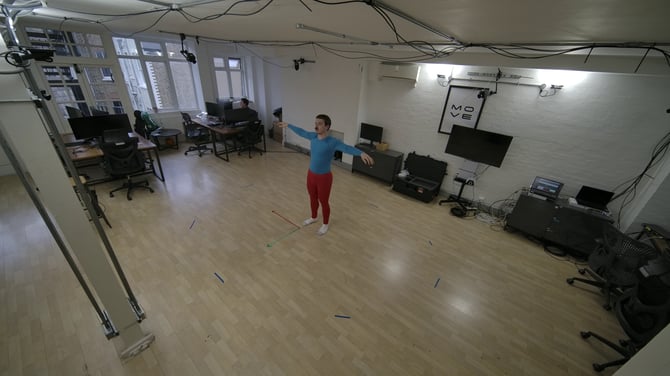
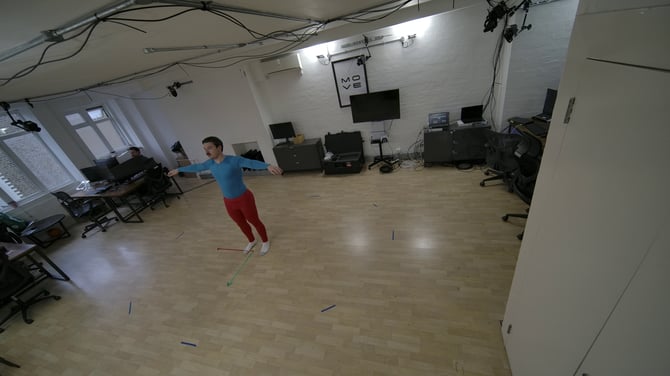
Poor Framing: In this example, the camera is rolled incorrectly and is not level with the floor. Additionally, there is significant dead space on both sides of the frame, resulting in wasted pixels. Since the best image quality is found in the center of the lens, ensure the actor is the focal point for every camera in your setup.
Next Step: Z-Cam Hardware Setup → Continue to the next article in System Prep & Setup.