---
title: Extracting Diagnostics
description: Generating Diagnostics from Genesis.
---
[Skip to content](https://docs.move.ai/knowledge/genesis-extracting-diagnostics#main-content)

Open main navigation
Close main navigation
- [Move](https://www.move.ai/)
[Move](https://www.move.ai/)
Welcome to the Move Knowledge Base
- There are no suggestions because the search field is empty.
1. [Move Docs](https://docs.move.ai/knowledge?hsLang=en)
2. [Genesis](https://docs.move.ai/knowledge/genesis?hsLang=en)
3. [Optimising your System](https://docs.move.ai/knowledge/genesis?hsLang=en#optimising-your-system)
# Extracting Diagnostics
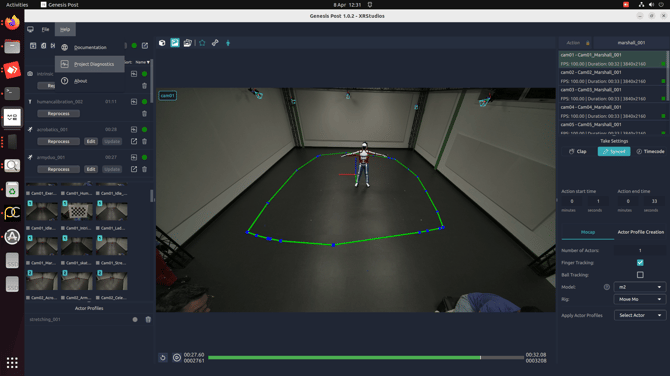
1. For general troubleshooting, you can zip up a diagnostics for the **Project Diagnostics**, which contains:
1. All logs for the application
2. All diagnostic data for all takes in this project
2. Should there be any issue caused by the input videos, you can zip up a diagnostics for a specific take, which contains:
1. All logs relating to runs of this Take
2. All diagnostic data for all takes in this project
3. The input videos used for the take (which can make this quite a large file but expedites the troubleshooting process)
How to find the diagnostics:
1. **Project Diagnostics:** Click the **Help** bar at the top of the screen and select **Project Diagnostics**.
2. **Exporting Take Diagnostics:** Click the **Collect Take Diagnostics** folder icon to export diagnostics. This can be **found** next to each **processed animation take**.
- [Genesis](https://docs.move.ai/knowledge/genesis?hsLang=en#main-content)
- [Overview](https://docs.move.ai/knowledge/genesis?hsLang=en#overview)
- [System Prep & Setup](https://docs.move.ai/knowledge/genesis?hsLang=en#system-prep-setup)
- [Genesis Live](https://docs.move.ai/knowledge/genesis?hsLang=en#genesis-live)
- [Genesis Post](https://docs.move.ai/knowledge/genesis?hsLang=en#genesis-post)
- [Output Data](https://docs.move.ai/knowledge/genesis?hsLang=en#output-data)
- [Optimising your System](https://docs.move.ai/knowledge/genesis?hsLang=en#optimising-your-system)
- [System Management](https://docs.move.ai/knowledge/genesis?hsLang=en#system-management)
- [Release Notes](https://docs.move.ai/knowledge/genesis?hsLang=en#release-notes)
- [Move One](https://docs.move.ai/knowledge/move-one?hsLang=en#main-content)
- [Move One Pricing](https://docs.move.ai/knowledge/move-one?hsLang=en#move-one-pricing)
- [Move Platform](https://docs.move.ai/knowledge/move-one?hsLang=en#move-platform)
- [Move One iOS App](https://docs.move.ai/knowledge/move-one?hsLang=en#move-one-ios-app)
- [Using your Animations](https://docs.move.ai/knowledge/move-one?hsLang=en#using-your-animations)
- [Legacy Accounts - App Store Billing](https://docs.move.ai/knowledge/move-one?hsLang=en#legacy-accounts-app-store-billing)
- [Troubleshooting](https://docs.move.ai/knowledge/troubleshooting?hsLang=en#main-content)
- [Z-Cams](https://docs.move.ai/knowledge/troubleshooting?hsLang=en#z-cams)
- [Genesis](https://docs.move.ai/knowledge/troubleshooting?hsLang=en#genesis)
[](http://move.ai)
www.move.ai
Copyright © 2026, Move AI