
Extrinsic calibration defines the camera positions, orientations, ground plane, and world origin of your capture volume. This process establishes a consistent 3D coordinate system that all cameras share.
To enable animation capture in Genesis, you must first calibrate the system using either a checkerboard or a human subject. In this article, we’ll walk you through the Checkerboard calibration process.
Prerequisite requirement: Minimum 6 camera setup should be used for Checkerboard calibrations, 3 cameras must see the board at all times for successful detections.
A1 for up to 20x20m volume
1. Processing the Calibration in Genesis Post
Creating the Calibration Take
- Create a new calibration take with your videos.
- Select Checkerboard as the calibration method.
- Start processing the take.
.png?width=400&height=151&name=Screenshot%20from%202026-02-18%2011-33-21%20(1).png)
Output validation
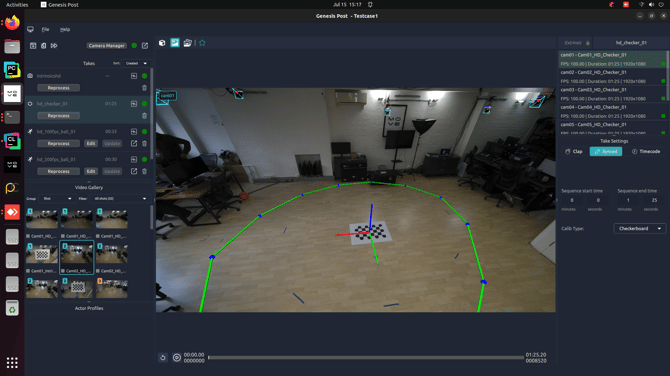
After processing, view the active capture area, world origin and camera transformations (positions and orientations) overlays in the viewport to verify the accuracy of the calibration
Check that:
- The origin is correctly placed at the centre of the volume
- The ground plane aligns with the physical floor
- Camera positions are consistent with the real-world setup
2. When to Recalibrate
Re-run checkerboard extrinsic calibration if:
- Any camera is moved or re-angled
- The capture volume size or layout changes
- The world origin or axis alignment needs adjustment