
Extrinsic calibration defines the camera positions, orientations, ground plane, and world origin of your capture volume. This process establishes a consistent 3D coordinate system that all cameras share.
To enable animation capture in Genesis, you must first calibrate the system using either a checkerboard or a human subject. In this article, we’ll walk you through the Checkerboard calibration process.
Prerequisite requirement: Minimum 6 camera setup should be used for Checkerboard calibrations, 3 cameras must see the board at all times for successful detections.
A1 for up to 20x20m volume
1. Locking the Camera Setup
Before recording the calibration:
- All cameras must be fully installed and locked in their final positions.
- Ensure lenses are focused and exposure is stable.
- The cameras should be at approximately a 45 degree angle when looking at the centre of the volume, to ensure the checkerboard can be detected well when placed on the floor
- Do not move or re-angle any camera/lens after extrinsic calibration.
Any camera/lens changes after calibration invalidates the result and requires recalibration.
2. Setting the World Origin
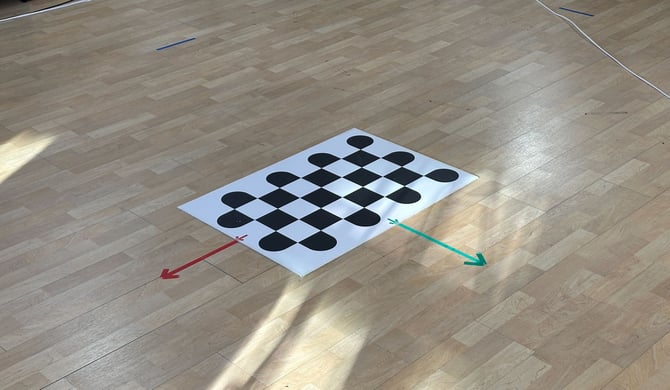
The position of the checkerboard during first few seconds of the calibration recording define the world coordinate system (0,0,0).
Initial Placement
- Place the checkerboard flat on the floor at the desired centre of the capture volume.
- This position defines:
- Ground Plane: Z = 0
- World Origin: The board’s reference coordinates
Axis Alignment
- The orientation of the checkerboard defines the X and Y axes of the world.
- If your floor has axis markings, align the arrows or edges of the board to match them.
Clear Initialisation
- Keep the capture volume completely empty for the first 2–3 seconds of recording.
- No people, equipment, or occlusions should be present.
3. Recording the Calibration Video
Here is an example
Note: This example action was taken using the Z-Cams.
- Sync Type: Checkerboard
- Sync method: Sync
Step-by-Step Movement Pattern
Follow this sequence carefully for best results:
- Start the video recording.
- Pick up the checkerboard from the centre of the volume, keeping it rigid and fully visible.
- Starting at the centre of the space, walk in a spiral motion outward to the edges of the capture volume, keeping the checkerboard facing the centre of the volume throughout the recording.
- Angle the checkerboard toward the cameras for the best view.
- When you reach the edge of the volume, begin to spiral back inward to the centre of the volume.
- Place the checkerboard in the same position as the starting position.
- Exit the capture volume and end the recordings. If an operator is controlling the cameras, ensure the actor has fully left the capture space before stopping the recording.
This motion pattern ensures:
- Robust triangulation across the full volume
- A well-defined virtual perimeter
%20(1).png?width=670&height=378&name=image%20(10)%20(1).png)