---
title: Activating the License
description: Step-by-step guide to licensing Genesis. Learn how to generate a unique license_request.json file, submit it for activation, and import your final license key.
---
[Skip to content](https://docs.move.ai/knowledge/genesis-activating-the-license#main-content)

Open main navigation
Close main navigation
- [Move](https://www.move.ai/)
[Move](https://www.move.ai/)
Welcome to the Move Knowledge Base
- There are no suggestions because the search field is empty.
1. [Move Docs](https://docs.move.ai/knowledge?hsLang=en)
2. [Genesis](https://docs.move.ai/knowledge/genesis?hsLang=en)
3. [System Prep & Setup](https://docs.move.ai/knowledge/genesis?hsLang=en#system-prep-setup)
# Activating the License
### **Requesting a License**
1. Launch Move Pro
2. Click the **Help** —\> **About**
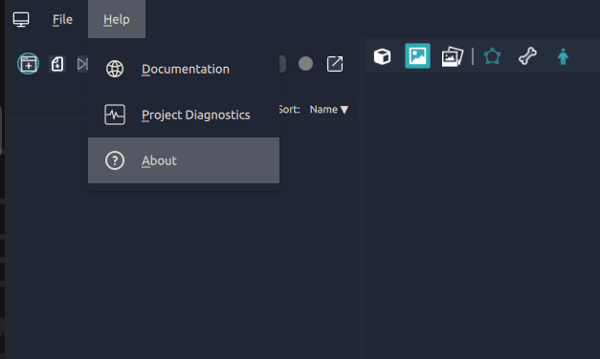
1. Click ‘**Generate license request**’
1. This will open a file explorer window containing the file listed below.
2. `license_request.json`

1. **Send** this JSON file to us to initiate your license key generation.
**Note:** This license is uniquely tied to your computer's hardware and operating system; please note that any modifications to either will **render the license invalid**.
---
### **Importing the license**
We have processed your license request. A new license JSON file has been sent to your email; please use it to activate your Genesis instance.
1. **Download** the new JSON file
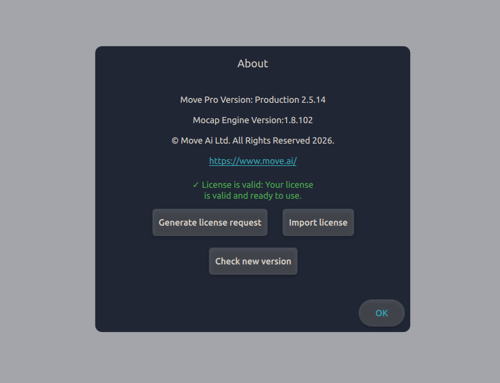
2. On the Genesis application. Click the ‘**Help**’ ⟶ ‘**About**’
.png?width=462&height=418&name=Screenshot%20from%202026-02-18%2016-35-27%20(1).png)
1. Click ‘**Import license**’
2. Find the license on your machine and select the JSON
3. Your license should now display as '**Valid**' and ready for use, indicated by the green confirmation on the About page shown above.
**Next Step**: [Studio Considerations](https://docs.move.ai/knowledge/genesis-shoot-considerations?hsLang=en) → Continue to the next article in System Prep & Setup.
- [Genesis](https://docs.move.ai/knowledge/genesis?hsLang=en#main-content)
- [Overview](https://docs.move.ai/knowledge/genesis?hsLang=en#overview)
- [System Prep & Setup](https://docs.move.ai/knowledge/genesis?hsLang=en#system-prep-setup)
- [Genesis Live](https://docs.move.ai/knowledge/genesis?hsLang=en#genesis-live)
- [Genesis Post](https://docs.move.ai/knowledge/genesis?hsLang=en#genesis-post)
- [Output Data](https://docs.move.ai/knowledge/genesis?hsLang=en#output-data)
- [Optimising your System](https://docs.move.ai/knowledge/genesis?hsLang=en#optimising-your-system)
- [System Management](https://docs.move.ai/knowledge/genesis?hsLang=en#system-management)
- [Release Notes](https://docs.move.ai/knowledge/genesis?hsLang=en#release-notes)
- [Move One](https://docs.move.ai/knowledge/move-one?hsLang=en#main-content)
- [Move One Pricing](https://docs.move.ai/knowledge/move-one?hsLang=en#move-one-pricing)
- [Move Platform](https://docs.move.ai/knowledge/move-one?hsLang=en#move-platform)
- [Move One iOS App](https://docs.move.ai/knowledge/move-one?hsLang=en#move-one-ios-app)
- [Using your Animations](https://docs.move.ai/knowledge/move-one?hsLang=en#using-your-animations)
- [Legacy Accounts - App Store Billing](https://docs.move.ai/knowledge/move-one?hsLang=en#legacy-accounts-app-store-billing)
- [Troubleshooting](https://docs.move.ai/knowledge/troubleshooting?hsLang=en#main-content)
- [Z-Cams](https://docs.move.ai/knowledge/troubleshooting?hsLang=en#z-cams)
- [Genesis](https://docs.move.ai/knowledge/troubleshooting?hsLang=en#genesis)
[](http://move.ai)
www.move.ai
Copyright © 2026, Move AI