---
title: Preparing the checkerboard
description: Learn how to prepare a calibration checkerboard for Genesis Live, including the correct board materials, printing specifications, surface finish, and scale verification to ensure accurate intrinsic and extrinsic camera calibration.
---
[Skip to content](https://docs.move.ai/knowledge/-preparing-the-checkerboard#main-content)

Open main navigation
Close main navigation
- [Move](https://www.move.ai/)
[Move](https://www.move.ai/)
Welcome to the Move Knowledge Base
- There are no suggestions because the search field is empty.
1. [Move Docs](https://docs.move.ai/knowledge?hsLang=en)
2. [Genesis](https://docs.move.ai/knowledge/genesis?hsLang=en)
3. [System Prep & Setup](https://docs.move.ai/knowledge/genesis?hsLang=en#system-prep-setup)
# Preparing the checkerboard
**Note:** The checkerboard is used for intrinsic and extrinsic calibrations.
The accuracy of intrinisic and extrinsic calibration depends heavily on the **physical quality** of the checkerboard. Rigidity, correct scale, and surface finish are critical.
### Board Requirements
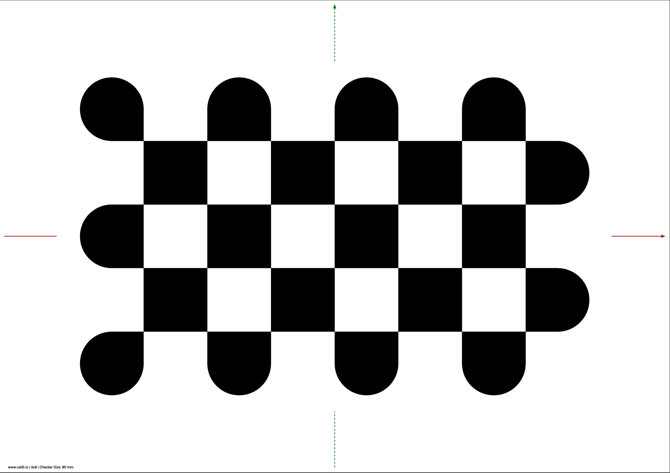
- **Image:** [A1.zip](https://docs.move.ai/hubfs/A1.zip?hsLang=en)
- **Material:** Print the provided checkerboard pattern with matt-over-laminate on an **A1 aluminium honeycomb or aluminium composite board**.
- IMPORTANT: The board must remain perfectly flat. Any bending or warping will reduce calibration accuracy.
- **Printing:** Print at **100% scale** (do not use *scale to fit*).
- **Finish:** Use a **matte finish** to prevent glare.
**Verification**
After printing, verify the squares are 80x80mm with a ruler to confirm accurate scale.
---
- [Genesis](https://docs.move.ai/knowledge/genesis?hsLang=en#main-content)
- [Overview](https://docs.move.ai/knowledge/genesis?hsLang=en#overview)
- [System Prep & Setup](https://docs.move.ai/knowledge/genesis?hsLang=en#system-prep-setup)
- [Genesis Live](https://docs.move.ai/knowledge/genesis?hsLang=en#genesis-live)
- [Genesis Post](https://docs.move.ai/knowledge/genesis?hsLang=en#genesis-post)
- [Output Data](https://docs.move.ai/knowledge/genesis?hsLang=en#output-data)
- [Optimising your System](https://docs.move.ai/knowledge/genesis?hsLang=en#optimising-your-system)
- [System Management](https://docs.move.ai/knowledge/genesis?hsLang=en#system-management)
- [Release Notes](https://docs.move.ai/knowledge/genesis?hsLang=en#release-notes)
- [Move One](https://docs.move.ai/knowledge/move-one?hsLang=en#main-content)
- [Move One Pricing](https://docs.move.ai/knowledge/move-one?hsLang=en#move-one-pricing)
- [Move Platform](https://docs.move.ai/knowledge/move-one?hsLang=en#move-platform)
- [Move One iOS App](https://docs.move.ai/knowledge/move-one?hsLang=en#move-one-ios-app)
- [Using your Animations](https://docs.move.ai/knowledge/move-one?hsLang=en#using-your-animations)
- [Legacy Accounts - App Store Billing](https://docs.move.ai/knowledge/move-one?hsLang=en#legacy-accounts-app-store-billing)
- [Troubleshooting](https://docs.move.ai/knowledge/troubleshooting?hsLang=en#main-content)
- [Z-Cams](https://docs.move.ai/knowledge/troubleshooting?hsLang=en#z-cams)
- [Genesis](https://docs.move.ai/knowledge/troubleshooting?hsLang=en#genesis)
[](http://move.ai)
www.move.ai
Copyright © 2026, Move AI